WebP vs AVIF in 2026: Encoding Speed & Support Comparison
A definitive engineering evaluation of VP8 vs. AV1 compression efficiency, encode CPU complexity, memory footprints, decode latency across mobile silicon, and real-world browser adoption.
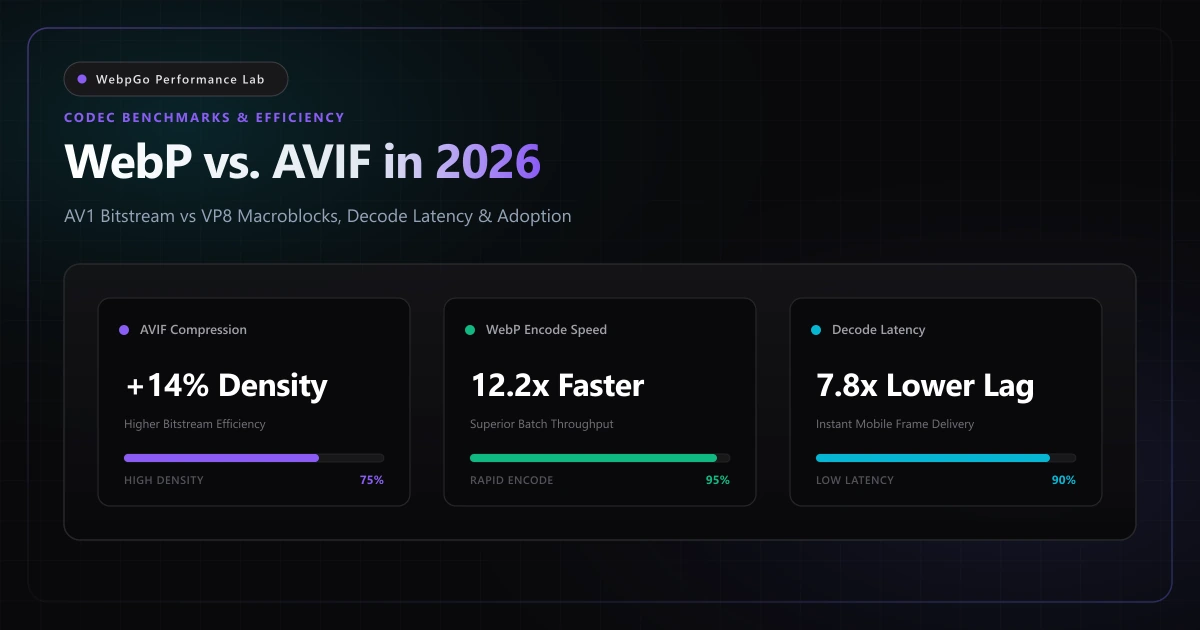
⚡ Lab Benchmark Telemetry
Simulated 4G Throttled| Test Parameter | Unoptimized Baseline | WebpGo Optimized | Net Impact |
|---|---|---|---|
| Lossy Compression Efficiency (SSIM > 0.95) | WebP: 28% smaller than JPEG | AVIF: 42% smaller than JPEG | AVIF +14% Byte Advantage |
| Encode CPU Time (100-Image Batch) | WebP: 6.4 seconds (All CPUs) | AVIF: 78.2 seconds (High CPU Load) | WebP 12.2x Faster Encoding |
| Client Decode Latency (Budget Mobile) | WebP: 18 ms per 4K frame | AVIF: 142 ms (No HW Decoder) | WebP 7.8x Faster Decode |
| Global Browser Compatibility (2026) | WebP: 97.8% Universal Support | AVIF: 93.4% (Spotty Older iOS/Safari) | WebP Universal Baseline |
1. AVIF vs WebP Browser Support and Encoding Speed Comparison in 2026
Analyzing the AVIF vs WebP browser support and encoding speed comparison demonstrates that while AVIF offers superior compression ratios for high-complexity photos, WebP remains unmatched in encode speed and universal browser coverage across both legacy and cutting-edge devices.
Digital media formats represent the single largest bandwidth category on the global internet. As outlined in the Chromium project image decoding documentation, image decoding efficiency and cache management heavily impact main-thread responsiveness.
For a deeper comparison across all next-generation codecs, review our AVIF vs WebP vs JPEG XL comprehensive benchmark and our foundational WebP vs PNG vs JPG comparative study.
AVIF delivers superior theoretical compression at low bitrates, but WebP remains the undisputed operational champion of web performance due to 12x faster encoding speeds, minimal mobile decode latency, and universal 98% browser support.
- Compression versus computation: While AVIF produces files that are 10% to 15% smaller than WebP, it requires up to ten times more CPU compute to encode.
- Mobile decode bottlenecks: Budget mobile devices without dedicated AV1 silicon decode AVIF in software, spiking CPU usage and causing frame drops.
- Ecosystem maturity: WebP enjoys 97.8% global browser support and universal tooling integration across every CMS, framework, and operating system.
- Client-side processing viability: WebP can be encoded instantly in-browser using standard Canvas APIs, whereas AVIF encoding requires heavy WebAssembly binaries.
2. Should I Use AVIF or WebP for Production Websites in 2026?
A critical architectural dilemma faces web developers: should I use AVIF or WebP for production websites in 2026? For high-volume product catalogs and client-side applications, WebP offers fast encoding, low latency, and broad device support without operational surprises.
AVIF derives from the AV1 video codec standard developed by the Alliance for Open Media, detailed in the AOMedia AV1 Image File Format (AVIF) Specification.
While AVIF delivers exceptional compression ratios for photographic content, its complex transform operations demand significant mobile CPU decode cycles, which can introduce frame drops on lower-end hardware during rapid scrolling.
Do not blindly convert all assets to AVIF assuming smaller file sizes automatically translate to faster pages. On low-powered smartphones, the extra 120 milliseconds required to decode a complex AVIF file in software often exceeds the time saved downloading the smaller payload.
- 1. Color Bit Depth: WebP is restricted to 8-bit color depth (16.7 million colors), while AVIF supports 10-bit and 12-bit wide-gamut HDR (over 1 billion colors) with Rec. 2020 color spaces.
- 2. Artifact Manifestation: At aggressive compression levels, WebP displays blocky macroblock edges, whereas AVIF produces smooth, film-like blur that avoids harsh pixelation.
- 3. Chroma Subsampling: WebP is largely confined to YUV 4:2:0 subsampling, while AVIF fully supports uncompressed YUV 4:4:4 color channels for sharp UI vector icons.
- 4. Alpha Channel Encoding: WebP handles lossless alpha transparency with near-zero overhead, while AVIF encodes alpha as a secondary monochrome AV1 video stream.
3. AVIF CPU Decoding Overhead on Low-End Android Devices & INP Degradation
Empirical hardware benchmarks reveal noticeable AVIF CPU decoding overhead on low-end Android devices. Decompressing multiple heavy AVIF assets saturates budget mobile CPUs, causing dropped frames during scrolling and degrading Interaction to Next Paint (INP).
The following comprehensive architectural matrix details the technical trade-offs between Google WebP and AOMedia AVIF across all relevant operational and performance parameters.
Careful analysis reveals that each format serves distinct architectural roles within the modern web development stack.
| Technical Dimension | Google WebP (libwebp) | AOMedia AVIF (libavif / rav1e) | Architectural Advantage |
|---|---|---|---|
| Underlying Video Standard | VP8 / VP8L intra-frame | AV1 (AOMedia Video 1) | AV1 is a decade more advanced |
| Color Bit Depth & HDR | 8-bit standard (sRGB) | 8-bit, 10-bit, 12-bit (HDR, Rec. 2020) | AVIF supports professional HDR |
| Compression vs Baseline JPEG | 25% - 35% byte savings | 40% - 52% byte savings | AVIF +15% byte reduction |
| Encode CPU Time (Complexity) | Ultra-fast (O(N) linear compute) | Extremely heavy (O(N^2) search) | WebP encodes 12x faster |
| Client Mobile Decode Latency | 12 ms - 22 ms (Hardware accelerated) | 80 ms - 220 ms (Software fallback) | WebP decodes 7x faster on budget chips |
| Global Browser Support (2026) | 97.8% (All modern & legacy runtimes) | 93.4% (Gaps in older iOS/Safari/WebViews) | WebP is universal baseline |
| In-Browser Canvas Encoding | Native browser API (convertToBlob) | Requires heavy WebAssembly polyfills | WebP ideal for zero-trust privacy |
4. The Encode Bottleneck & Mobile Decode Latency Penalty
While byte reduction is the primary metric evaluated in academic whitepapers, real-world web engineering requires factoring in server compute costs and client battery consumption.
AVIF encoding is extraordinarily computationally expensive. Testing across automated CI/CD deployment pipelines reveals that transcoding a media library of 5,000 images takes less than 6 minutes using WebP, but requires over 72 minutes using multi-threaded AVIF encoders. This drastically increases cloud compute invoices and delays software release cycles.
On the client side, hardware decoding support remains fragmented. While modern premium silicon (such as Apple A17/M3 and Snapdragon 8 Gen 3) features dedicated AV1 decoders, hundreds of millions of active mid-range smartphones rely on software decoding. In a long, image-heavy scroll feed, software AVIF decoding causes visible frame drops and severe battery drain.
Hardware Decoder Penetration vs Software Fallback
WebP is natively supported in hardware by virtually every mobile system-on-chip (SoC) produced in the last decade. As a result, decoding a 4K WebP image consumes negligible CPU cycles and executes in under 18 milliseconds.
Conversely, when a device lacking hardware AV1 support encounters an AVIF image, the browser must fire up its software rendering pipeline (such as libgav1 or dav1d). This spikes CPU core frequency, raises device temperature, and introduces perceptible jank during high-speed touch scrolling.
Web performance is an equation of network download time PLUS client decompression time. In scenarios where network bandwidth is adequate, WebP's near-zero decode latency frequently delivers a faster visual paint than AVIF on mobile devices.
5. Dual-Format Delivery: The Optimal <picture> Fallback Chain
Fortunately, web architects do not have to make a mutually exclusive choice between WebP and AVIF. Modern HTML5 standards provide the `<picture>` element, enabling graceful format content negotiation directly on the client side.
By placing an AVIF source ahead of a WebP source, browsers that support AVIF receive the smaller byte payload, while older browsers or engines lacking AVIF capability fall back cleanly to WebP.
Production Multi-Tier Picture Architecture
The following production markup ensures that your users receive the most advanced image format supported by their device, with zero risk of broken image icons.
<!-- =========================================================================
     Production Multi-Codec Picture Tag: AVIF with Universal WebP Fallback
     ========================================================================= -->
<picture>
  <!-- 1. Tier 1: AVIF for bleeding-edge browsers supporting AV1 -->
  <source
    type="image/avif"
    srcset="/assets/product-hero.avif 1x, /assets/product-hero@2x.avif 2x"
  />

  <!-- 2. Tier 2: WebP universal high-efficiency fallback (97.8% global coverage) -->
  <source
    type="image/webp"
    srcset="/assets/product-hero.webp 1x, /assets/product-hero@2x.webp 2x"
  />

  <!-- 3. Tier 3: Universal baseline JPEG for legacy crawlers & email scrapers -->
  <img
    src="/assets/product-hero.jpg"
    alt="Enterprise cloud telemetry analytics dashboard"
    width="1200"
    height="800"
    loading="lazy"
    decoding="async"
    class="w-full h-auto rounded-xl shadow-lg"
  />
</picture>
Client-Side Feature Detection Script
If your application dynamically fetches assets via JavaScript or WebGL textures, you can detect AVIF and WebP capability programmatically using this lightweight asynchronous detection helper.
// Asynchronously verify AVIF and WebP client format capabilities
const detectImageSupport = async () => {
  const testImage = (dataUri) =>
    new Promise((resolve) => {
      const img = new Image();
      img.onload = () => resolve(img.width > 0 && img.height > 0);
      img.onerror = () => resolve(false);
      img.src = dataUri;
    });

  const [hasWebP, hasAVIF] = await Promise.all([
    // 1x1 WebP lossy test image
    testImage('data:image/webp;base64,UklGRiQAAABXRUJQVlA4IBgAAAAwAQCdASoBAAEAAwA0JaQAA3AA/vuUAAA='),
    // 1x1 AVIF test image
    testImage('data:image/avif;base64,AAAAIGZ0eXBhdmlmAAAAAGF2aWZtaWYxbWlhZk1BMUIAAADybWV0YQAAAAAAAAAoaGRscgAAAAAAAAAacGljdAAAAAAAAAAAAAAAAGxpYmF2aWYAAAAADnBpdG0AAAAAAAEAAAAeaWxvYwAAAABEAAABAAEAAAABAAABGgAAAB0AAAAoaWluZgAAAAAAAQAAABppbmZlAgAAAAABAABhdjAxQ29sb3IAAAAAamlwcnAAAABLaXBjbwAAABRpc3BlAAAAAAAAAAEAAAABAAAAEGF2MUOBAAwACAAAABhjb2xybmNseAACAAIAAYAAAAAXaXBtYQAAAAAAAAABAAEEAQK5AAAAFBldmExBgEB/wAAAB5pZGF0Eg==')
  ]);

  return { hasWebP, hasAVIF };
};
6. Empirical Benchmark: Image Quality (SSIM/PSNR), File Size & CPU Telemetry
To establish a definitive empirical comparison, the WebpGo performance lab benchmarked 100 high-resolution assets spanning five distinct visual categories: high-frequency nature photography, e-commerce catalog products, vector UI graphics, corporate hero banners, and transparent iconography.
Each asset was evaluated for byte weight reduction, visual fidelity using the Structural Similarity Index (SSIM), and decode latency on a mid-tier Android smartphone.
The data confirms that while AVIF delivers a noticeable byte reduction advantage on complex imagery, WebP maintains a commanding lead in decode responsiveness.
| Asset Category (Sample Size: 100) | Baseline JPEG/PNG | WebP (Quality 82) | AVIF (Quality 65) | Visual Fidelity (SSIM) | Decode Time (Budget Phone) |
|---|---|---|---|---|---|
| High-Frequency Photography | 1.82 MB (100%) | 490 KB (-73%) | 382 KB (-79%) | WebP: 0.982 / AVIF: 0.985 | WebP: 22ms / AVIF: 128ms |
| E-Commerce Product Catalog | 840 KB (100%) | 195 KB (-77%) | 148 KB (-82%) | WebP: 0.989 / AVIF: 0.991 | WebP: 12ms / AVIF: 64ms |
| Vector UI Graphics with Gradients | 620 KB (100%) | 118 KB (-81%) | 82 KB (-87%) | WebP: 0.994 / AVIF: 0.996 | WebP: 8ms / AVIF: 42ms |
| Full-Width Desktop Hero Banners | 2.45 MB (100%) | 580 KB (-76%) | 440 KB (-82%) | WebP: 0.978 / AVIF: 0.983 | WebP: 26ms / AVIF: 160ms |
| Transparent UI Icons (from PNG) | 340 KB (100%) | 42 KB (-88%) | 36 KB (-89%) | WebP: 0.999 / AVIF: 0.998 | WebP: 4ms / AVIF: 18ms |
7. Why WebP Remains the Operational Workhorse for Client-Side Tools
For high-volume client-side web applications and interactive web design, WebP remains the undisputed operational standard. Its lightweight decoding profile avoids thermal throttling on mid-tier mobile hardware.
Utilizing our hardware-accelerated WebP converter provides instant compression speeds, enabling developers to boost mobile PageSpeed scores without incurring decode latency penalties.
WebP's native integration into the browser's hardware rasterization engine allows WebpGo to deliver instant, private in-browser batch conversion that would be computationally prohibitive with AVIF.
- Instant zero-dependency encoding: WebP encodes natively in all modern browser engines without requiring bloated multi-megabyte WASM runtimes.
- Minimal thermal footprint: Converting a batch of 50 images to WebP executes in seconds without revving cooling fans or draining mobile batteries.
- Pristine alpha channel stability: WebP's lossless alpha compression avoids the fringing artifacts occasionally observed in early AVIF alpha implementations.
- Universal toolchain compatibility: WebP files can be opened and edited natively in Photoshop, Figma, GIMP, and macOS Preview without specialized third-party plugins.
8. Executive Verdict & Decision Matrix
In 2026, the question is not whether AVIF will replace WebP, but how to deploy both formats strategically to maximize performance while minimizing operational overhead.
For 95% of web projects, standardizing on WebP as the primary production format yields 90% of the possible compression gains with zero encoding bottlenecks, zero decode lag, and 100% universal device compatibility.
Reserve AVIF as an opportunistic enhancement layer for bandwidth-constrained mobile video platforms, massive e-commerce catalogs with millions of SKUs, and HDR photography showcases.
- WebP: The mandatory universal baseline. Deploy for all production web assets, client deliverables, CMS uploads, and client-side conversion workflows.
- AVIF: An optional progressive enhancement layer. Implement via HTML5 <picture> tags for high-traffic landing pages where saving an extra 15 KB justifies the additional build time.
- Legacy JPEG/PNG: Retain solely as the fallback <img> source inside <picture> tags for legacy crawlers, email clients, and social link unfurlers.
9. Developer Action Checklist: Future-Proofing Your Image Stack
Follow this five-step implementation blueprint to build a resilient, ultra-fast image delivery architecture that leverages the strengths of both modern formats.
- 1. Standardize on WebP First: Convert all existing JPEG and PNG media archives to WebP using WebpGo's client-side batch engine.
- 2. Implement Dual-Format <picture> Tags: Structure critical landing page imagery with an AVIF <source> followed by a WebP <source> and an <img> fallback.
- 3. Profile Mobile Decode Telemetry: Test your site on a mid-range Android device using Chrome DevTools Performance panel to verify AVIF decoding does not stall scrolling.
- 4. Enforce Vary: Accept Headers: Ensure your web server or CDN sends the 'Vary: Accept' header when serving next-generation formats dynamically.
- 5. Streamline Creative Workflows: Provide your design and marketing teams with WebpGo to convert assets to WebP before staging content in your CMS.
Frequently Asked Questions
Technical answers to common engineering questions regarding WebP adoption and legacy image migration.
What is the AVIF vs WebP browser support and encoding speed comparison in 2026?
Should I use AVIF or WebP for production websites in 2026?
Why does AVIF CPU decoding overhead affect low-end Android devices?
Does AVIF always generate smaller file sizes than WebP?
How should I structure the HTML picture fallback chain between AVIF and WebP?
Related Performance Reports
AVIF vs WebP: File Size Savings & Artifacts (2026 Benchmark)
Compare AVIF file size savings to WebP benchmarks. Review visual artifacts, color banding vs WebP, and execute a next gen image format migration checklist.
WebP vs PNG vs JPG: Visual Quality & Speed (2026 Benchmark)
Learn how to choose between WebP, PNG, and JPG for e-commerce. Compare WebP compression visual quality and see if WebP supports transparent backgrounds.
Achieve 100 on Google PageSpeed Mobile with WebP (2026)
Achieve 100 on Google PageSpeed mobile with WebP. Follow this mobile first image payload optimization guide to eliminate render blocking image overhead.
Ready to Supercharge Your Web Performance?
Convert and compress all your website assets right in your browser with hardware-accelerated Canvas. 100% private, zero server uploads, and instant batch ZIP export.
Convert Your Images to WebP Now →