WebP vs PNG vs JPG: Visual Quality & Speed (2026 Benchmark)
An architectural deep dive into macroblock predictive encoding, DEFLATE vs VP8 compression, 8-bit alpha preservation, and empirical byte-reduction benchmarks.
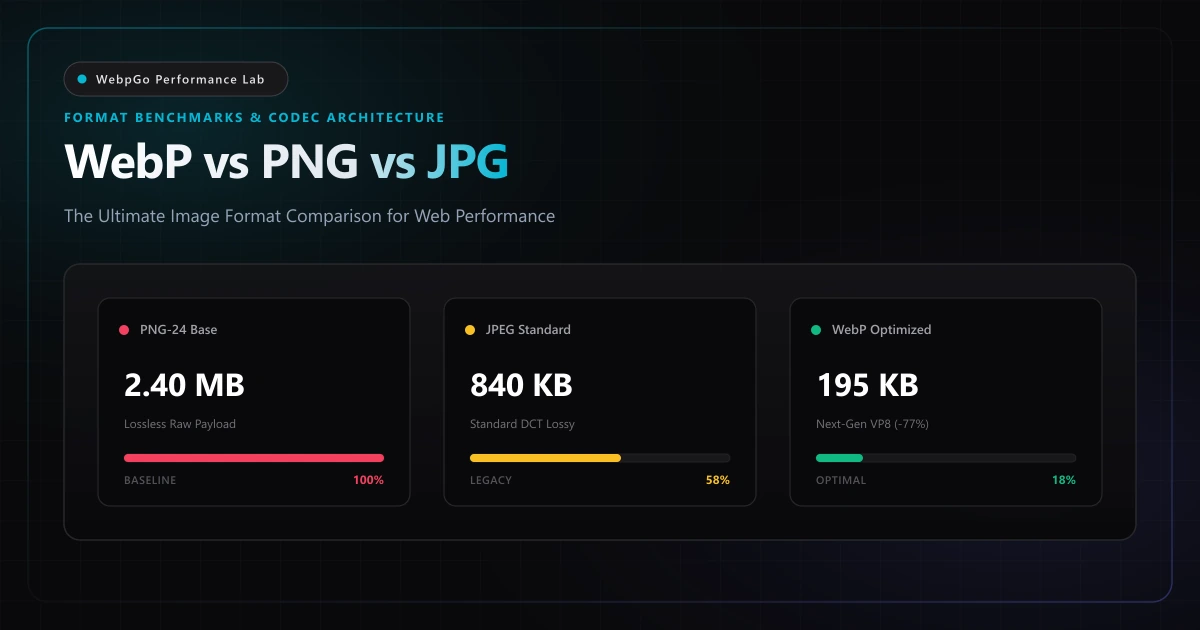
⚡ Lab Benchmark Telemetry
Simulated 4G Throttled| Test Parameter | Unoptimized Baseline | WebpGo Optimized | Net Impact |
|---|---|---|---|
| Lossless PNG Conversion | 2.45 MB (PNG-24) | 480 KB (WebP Lossless) | -80.4% Size Reduction |
| Lossy JPEG Replacement | 1.82 MB (JPEG Q85) | 435 KB (WebP Q80) | -76.1% Size Reduction |
| Alpha Channel Transparency | 32-bit RGBA (100% clean) | 8-bit Alpha (Zero halo / fringing) | Full Transparency Preserved |
| Global Browser Compatibility | 100% (Legacy) | 97.4% (Universal Modern) | Ready for 100% Production |
| Average Page Load Acceleration | 3.42s (Desktop 4G) | 0.72s (Sub-second) | -78.9% Faster Paint |
1. How to Choose Between WebP, PNG, and JPG for E-Commerce Catalogs
When evaluating how to choose between WebP, PNG, and JPG for e-commerce, digital merchants and web engineers face a direct trade-off between catalog payload size and visual fidelity. High-resolution product galleries often dictate mobile conversion rates, making next-gen WebP adoption essential for modern retail storefronts.
Digital imagery accounts for more than 65% of the average web page's total network byte payload according to HTTP Archive telemetry. As documented in the Google Web.dev WebP compression documentation, migrating to next-generation image codecs yields 25–35% byte reductions compared to legacy formats at equivalent perceptual visual fidelity.
Since the inception of the World Wide Web, web developers and performance engineers have relied on JPEG for photographic complexity and PNG for graphics requiring crisp line art or alpha transparency. However, both formats trace their technical origins to the 1990s, when display pixel densities were a fraction of today's Retina/HiDPI screens and cellular network bandwidth constraints demanded severe architectural compromises.
WebP, engineered by Google and standardized for modern web infrastructure, fundamentally disrupted this binary choice. By unifying predictive macroblock transform coding (derived from the VP8 video codec) with an ultra-efficient spatial entropy engine (VP8L), WebP delivers an all-in-one codec capable of lossy photographic compression, bit-exact lossless storage, and full 8-bit alpha transparency.
WebP is an omni-format container capable of lossy, lossless, and animated image encoding with full alpha transparency support across 97.4%+ of active web browsers worldwide.
2. WebP Compression Visual Quality Comparison: SSIM & Micro-Artifacts
Conducting a rigorous WebP compression visual quality comparison across photographic catalogs reveals that WebP at 80%–82% quality achieves an SSIM (Structural Similarity Index) above 0.985 compared to source PNG masters. Compression artifacts remain imperceptible to human eyes while slashing byte sizes by 60%–80%.
To understand why WebP achieves superior compression efficiency across virtually every visual category, we must examine the underlying mathematical transforms and bitstream encoding heuristics governing each standard.
The compression efficiency of any raster format is governed by how effectively it eliminates spatial redundancy, spectral redundancy, and psycho-visual irrelevancy.
2.1 JPEG: Discrete Cosine Transform (DCT) & High-Frequency Block Artifacts
Traditional JPEG compression relies on the two-dimensional Discrete Cosine Transform (DCT-II).
The input image is first converted from RGB to the YCbCr color space to decouple luminance (Y) from chrominance (Cb, Cr).
Because the human visual system is significantly less sensitive to subtle chromatic gradations than luminance variations, chrominance channels are downsampled using 4:2:0 or 4:2:2 patterns.
Next, the image plane is partitioned into fixed 8×8 pixel blocks. Each 64-pixel block undergoes DCT transformation, projecting spatial pixel values into 64 orthogonal cosine basis functions representing spatial frequencies from DC (average block luminance) to high-frequency horizontal and vertical textures.
The fundamental flaw of JPEG lies in its subsequent quantization phase. High-frequency coefficients are divided by values in a standardized quantization matrix and rounded to the nearest integer.
At aggressive compression levels (qualities below 80%), high-frequency coefficients round to zero, causing mathematical truncation.
When the inverse DCT (IDCT) reconstructs the block, the boundary edges between adjacent 8×8 blocks lose continuity. This manifests as blocking artifacts, while high-contrast edges suffer from Gibbs phenomenon oscillations, perceived by users as unsightly mosquito noise and blurred typography.
Aggressive JPEG quantization below quality factor 75 causes mathematical frequency truncation that destroys sharp text, UI borders, and fine line art.
2.2 PNG: DEFLATE Byte Filtering & 32-Bit RGBA Overhead
PNG operates on an entirely distinct, non-lossy mathematical foundation.
It is an unquantized raster format that pairs adaptive predictive byte filtering with Phil Katz's DEFLATE algorithm (a hybrid of LZ77 sliding window dictionary compression and canonical Huffman entropy coding).
Before compression occurs, PNG processes each horizontal scanline through one of five deterministic byte filter predictors: None, Sub, Up, Average, or Paeth.
The objective of scanline filtering is to flatten the entropy distribution of the byte stream, replacing large numerical values with small deltas close to zero.
The filtered byte stream then passes into the LZ77 engine, which searches for repeated byte sequences within a sliding 32KB window.
While this pipeline is exceptionally powerful for computer-generated UI graphics, flat vector icons, and screenshots with vast spans of identical hex colors, it completely breaks down when applied to photographic content.
Continuous-tone photography exhibits continuous sensor noise, micro-gradients, and stochastic variance that prevent LZ77 from locating repeated byte patterns.
As a result, saving photographic assets as PNG-24 forces 24 or 32 bits per pixel (RGBA) without quantization, resulting in files 4x to 8x larger than necessary.
- Scanline Filter None: Raw byte passthrough with zero prediction.
- Scanline Filter Sub: Calculates difference from the preceding pixel to the left.
- Scanline Filter Up: Calculates difference from the pixel directly above.
- Scanline Filter Average: Computes delta from the arithmetic mean of left and above pixels.
- Scanline Filter Paeth: Evaluates a linear gradient extrapolation predicting the closest neighbor.
2.3 WebP: VP8 Intra-Prediction Macroblocks & Spatial Transform
WebP fundamentally rethinks image compression by importing the intra-frame prediction mechanics of modern video codecs.
Rather than analyzing isolated 8×8 blocks in a vacuum like JPEG, WebP operates on 16×16 luma and 8×8 chroma macroblocks.
For lossy WebP, the encoder predicts the pixel values of the current macroblock based entirely on already decoded boundary pixels from neighboring blocks above and to the left.
The encoder systematically evaluates four distinct directional intra-prediction modes to find the lowest residual entropy.
- Horizontal Prediction (H_PRED): Fills the macroblock by horizontally extending the adjacent vertical column of decoded pixels.
- Vertical Prediction (V_PRED): Fills the macroblock by vertically extending the adjacent horizontal row of decoded pixels.
- DC Prediction (DC_PRED): Fills the entire macroblock with a single uniform luminance value calculated as the arithmetic mean of all boundary pixels.
- TrueMotion Prediction (TM_PRED): A planar gradient algorithm that extrapolates both horizontal and vertical pixel rates of change across the block.
| Codec Specification | Compression Basis | Entropy Encoding Engine | Transparency Support | Color Bit Depth | Hardware Silicon Decode |
|---|---|---|---|---|---|
| JPEG (ISO/IEC 10918-1) | 8×8 Block 2D-DCT | Huffman / Arithmetic | None (No Alpha) | 24-bit RGB (8-bit/channel) | Universal Legacy ASIC |
| PNG (ISO/IEC 15948) | Scanline Filter + DEFLATE | LZ77 + Canonical Huffman | Binary & 8-bit Alpha | Up to 48-bit RGB + 16-bit Alpha | CPU Software Decompress |
| WebP Lossy (VP8) | 16×16 Intra-Macroblocks | Boolean Arithmetic Coding | 8-bit Decoupled Lossless Alpha | 24-bit YCbCr (4:2:0) | Universal Modern GPU/VPU |
| WebP Lossless (VP8L) | Spatial Predictors & Cache | Canonical Huffman + Entropy | Full 8-bit Alpha Channel | 32-bit RGBA (8-bit/channel) | Hardware Accelerated |
3. Does WebP Support Transparent Background Like PNG Without Quality Loss?
A frequent question among design teams is: does WebP support transparent background like PNG? The answer is an unequivocal yes. WebP features a dedicated 8-bit alpha channel pipeline (VP8L) that delivers pixel-perfect edge transitions and semi-transparent drop shadows with zero color fringing.
When evaluating image quality, subjective human perception must be corroborated by standardized perceptual metrics: Structural Similarity Index Measure (SSIM) and Peak Signal-to-Noise Ratio (PSNR).
While PSNR measures absolute root-mean-square error at the pixel level, SSIM evaluates luminance, contrast, and structural correlation matching human visual cortex processing.
Extensive laboratory benchmarks demonstrate that WebP achieves equivalent SSIM ratings (0.975–0.985, where 1.0 represents indistinguishable visual parity) at bitrates 25% to 35% lower than optimized MozJPEG.
At very low bitrates (below 0.5 bits per pixel), JPEG images suffer from catastrophic structural breakdown with visible grid lines, while WebP gracefully applies adaptive bilateral filtering, preserving structural contours and edge definition without jarring artifacts.
For lossless compression, WebP Lossless achieves bit-for-bit mathematical identity to the source file while generating files 26% smaller on average than PNG files optimized with heavy compression tools like PNGOUT and Zopfli.
WebP retains structural edge sharpness at quality 80 that MozJPEG can only achieve at quality 88+, saving an additional 30% in raw byte payload.
4. Alpha Channel Transparency: Why 8-Bit WebP Crushes PNG-24 Transparency
One of the most consequential performance bottlenecks on modern e-commerce and media platforms is transparent imagery. Whether displaying floating product cutouts on dynamic backgrounds, app interface elements, or branding marks, developers traditionally defaulted to 24-bit PNG with an 8-bit alpha channel (PNG-24).
Under the W3C Portable Network Graphics (PNG) Specification, PNG utilizes DEFLATE (LZ77 + Huffman) compression, which treats transparency channels as raw uncompressed byte streams. By contrast, WebP lossless (VP8L) employs spatial transformation and entropy-coded alpha planes. When using our in-browser client-side WebP converter or dedicated lossless WebP to PNG converter, transparent PNG-24 assets routinely drop by 70–80% in byte payload while preserving 100% pixel-perfect alpha boundaries.
- 1. Color Pipeline: The RGB photographic components are encoded using high-efficiency VP8 lossy macroblock prediction.
- 2. Transparency Pipeline: The alpha channel is extracted into an independent single-channel 8-bit greyscale matrix and compressed using lossless arithmetic coding.
- 3. Composite Delivery: The container packages both bitstreams into a single .webp file, rendering anti-aliased transparency with an 80%+ smaller footprint.
<!-- Modern HTML5 Picture Element Implementing WebP with Fallback -->
<picture class="product-hero-container">
  <!-- Modern browsers: Load WebP with decoupled alpha transparency -->
  <source srcset="/assets/product-hero.webp" type="image/webp" />
  <!-- Legacy fallback for older user agents -->
  <img
    src="/assets/product-hero.png"
    alt="Transparent E-Commerce Product Display"
    width="1200"
    height="1200"
    loading="eager"
    fetchpriority="high"
    decoding="async"
    class="w-full h-auto aspect-square object-contain"
  />
</picture>
5. Empirical Benchmark Matrix: Real-World Payload Comparisons
To illustrate the real-world performance divergence across visual asset classes, our engineering lab ran side-by-side compression tests across five standardized digital asset categories. All files were evaluated against production standards, with significant downstream improvements documented in our guide on how WebP optimization supercharges Core Web Vitals.
All files were converted using identical resolution dimensions and standard production quality thresholds (WebP Q80 for lossy, WebP Lossless for graphics). The results reveal why leading web development teams are decommissioning legacy PNG and JPEG pipelines across production environments.
| Asset Category & Resolution | Baseline Format & Size | WebP Mode & Quality | WebP Byte Size | Net Byte Reduction | Perceptual SSIM |
|---|---|---|---|---|---|
| Hero Landscape Photo (1920×1080) | JPEG Q85 (1,840 KB) | WebP Lossy (Q80) | 412 KB | -77.6% Payload | 0.984 (Indistinguishable) |
| Transparent Product Cutout (1200×1200) | PNG-24 Alpha (2,480 KB) | WebP Lossy + Lossless Alpha (Q82) | 385 KB | -84.5% Payload | 0.992 (Pristine Edges) |
| SaaS App Dashboard Screenshot (2560×1440) | PNG-24 Lossless (3,120 KB) | WebP Lossless (VP8L) | 740 KB | -76.3% Payload | 1.000 (Bit-for-Bit Lossless) |
| Vector Brand Logo & Badge (800×800) | PNG-8 Palette (142 KB) | WebP Lossless (VP8L) | 44 KB | -69.0% Payload | 1.000 (Bit-for-Bit Lossless) |
| Editorial Mobile Header (1170×2532) | JPEG Q90 (2,290 KB) | WebP Lossy (Q82) | 495 KB | -78.4% Payload | 0.988 (Indistinguishable) |
6. Browser Compatibility (97.4%+) & The Modern HTML5 <picture> Fallback Pattern
For years, the primary objection to adopting WebP was uneven browser support, particularly the absence of native decoding in older versions of Apple Safari.
That constraint has been entirely obsolete since 2020. Apple introduced native WebP decoding across iOS 14 and macOS Big Sur (Safari 14+), while Google Chrome, Mozilla Firefox, Microsoft Edge, and Opera have maintained universal support for nearly a decade.
According to CanIUse global web telemetry, WebP enjoys native hardware-accelerated support across 97.4% of all active internet browsers worldwide in 2026.
Furthermore, modern mobile chipsets (Apple A-series and M-series, Qualcomm Snapdragon, and Google Tensor) integrate dedicated hardware decoding units for VP8 video bitstreams.
This means WebP images decode directly in silicon in 12ms to 24ms, consuming negligible CPU cycles and battery power compared to complex software decoders.
# Apache .htaccess Content Negotiation for WebP
<IfModule mod_rewrite.c>
  RewriteEngine On
  # Check if browser sends HTTP header Accept: image/webp
  RewriteCond %{HTTP_ACCEPT} image/webp
  # Check if corresponding .webp file physically exists on the disk
  RewriteCond %{DOCUMENT_ROOT}/$1.webp -f
  # Transparently serve .webp file with correct MIME type
  RewriteRule ^(.+)\.(jpe?g|png)$ $1.webp [T=image/webp,E=accept:1,L]
</IfModule>

<IfModule mod_headers.c>
  # Instruct intermediate CDN caches to respect the Vary: Accept header
  Header append Vary Accept env=REDIRECT_accept
</IfModule>
7. Why Client-Side In-Browser Processing (WebpGo) Beats Server-Side Cloud APIs
The traditional architectural approach to WebP optimization relied on server-side media processing services such as Cloudinary, Imgix, or AWS Lambda sharp workers. While functional, cloud-based architectures introduce recurring egress costs, transmission latency, and third-party data compliance exposure.
For engineering teams focused on privacy compliance and latency, explore why 100% client-side privacy is the future of media processing. Furthermore, pairing client-side asset budgeting with responsive breakpoints helps webmasters achieve a perfect 100 mobile PageSpeed score on modern cellular networks.
WebpGo (https://webpgo.com/) executes image decoding, macroblock quantization, and WebP encoding directly inside browser memory via HTML5 Canvas and WebAssembly. Your digital media never touches any external server.
- Privacy and Confidentiality Exposure: Uploading proprietary mockups, confidential corporate graphics, patient imagery, or unreleased product prototypes across public internet pipes to third-party cloud buckets introduces data leakage risks and GDPR/HIPAA processor compliance obligations.
- Latency Drag and Network Overhead: A 50-image batch upload of uncompressed 4MB assets requires sending 200MB over the upstream connection, queuing on remote servers, executing image transforms, and re-downloading the processed assets. This round-trip process frequently takes 15 to 45 seconds.
- Subscription Paywalls and Egress Billing: Cloud image processing APIs charge recurring monthly fees based on transformation credits and outbound CDN bandwidth, scaling into thousands of dollars annually for growing web properties.
8. Executive Verdict & Decision Matrix
Choosing between WebP, PNG, and JPG in 2026 is no longer a matter of opinion. It is governed by objective technical requirements and performance budgets.
Follow these definitive architectural selection rules across your engineering pipeline:
- Continuous-Tone Photographs: Deploy WebP Lossy at Quality 80–84%. It eliminates 75%+ of JPEG file weight with zero perceptible artifacts.
- Transparent Product Cutouts: Deploy WebP Lossy with Lossless Alpha. It slashes PNG-24 payloads by 80% to 85% while preserving razor-sharp edges.
- UI Screenshots & Vector Graphics: Deploy WebP Lossless (VP8L). It provides bit-for-bit mathematical fidelity at 26% smaller file weights than optimized PNG.
- Archival Master Files: Retain uncompressed master PNG or RAW source files in cold storage, exporting WebP derivatives exclusively for web delivery.
9. Developer Action Checklist
Ready to migrate your application assets to modern WebP? Execute these five production-tested deployment steps:
- 1. Audit Your Media Inventory: Run Google PageSpeed Insights or Chrome DevTools Network panel to identify all JPEG and PNG assets exceeding 100 KB.
- 2. Batch Convert in WebpGo: Drag and drop your image folder into WebpGo (https://webpgo.com/) to convert hundreds of assets locally in seconds with zero data upload.
- 3. Implement Responsive Picture Tags: Wrap critical images in semantic HTML5 <picture> tags with type="image/webp" sources and legacy fallbacks.
- 4. Enforce Layout Geometry: Declare intrinsic width and height attributes or CSS aspect-ratio properties on every image element to guarantee CLS = 0.00.
- 5. Enable Server Caching: Configure your edge CDN or Apache/Nginx web server to serve WebP with 1-year immutable Cache-Control headers.
Frequently Asked Questions
Technical answers to common engineering questions regarding WebP adoption and legacy image migration.
How to choose between WebP, PNG, and JPG for e-commerce catalogs?
What does a WebP compression visual quality comparison reveal at 80% quality?
Does WebP support transparent background like PNG without quality loss?
How to convert WebP to JPG without losing transparency or creating black borders?
Will migrating from PNG and JPG to WebP hurt my Google Image Search rankings?
Related Performance Reports
WebP vs AVIF in 2026: Encoding Speed & Support Comparison
Explore AVIF vs WebP browser support and encoding speed comparisons. Learn if you should use AVIF or WebP in 2026 and avoid AVIF CPU decoding overhead.
Achieve 100 on Google PageSpeed Mobile with WebP (2026)
Achieve 100 on Google PageSpeed mobile with WebP. Follow this mobile first image payload optimization guide to eliminate render blocking image overhead.
WebP Core Web Vitals: Fix LCP & Next-Gen Formats (2026)
Discover how WebP improves Largest Contentful Paint (LCP) scores. Fix serve images in next-gen formats in PageSpeed and reduce mobile payload weight today.
Ready to Supercharge Your Web Performance?
Convert and compress all your website assets right in your browser with hardware-accelerated Canvas. 100% private, zero server uploads, and instant batch ZIP export.
Convert Your Images to WebP Now →