Boost E-Commerce Speed 60%: Increase Conversions with WebP
An architectural playbook for Shopify, WooCommerce, and Headless storefronts to slash catalog payload weight, achieve sub-second mobile LCP, and unlock double-digit checkout conversion lifts.
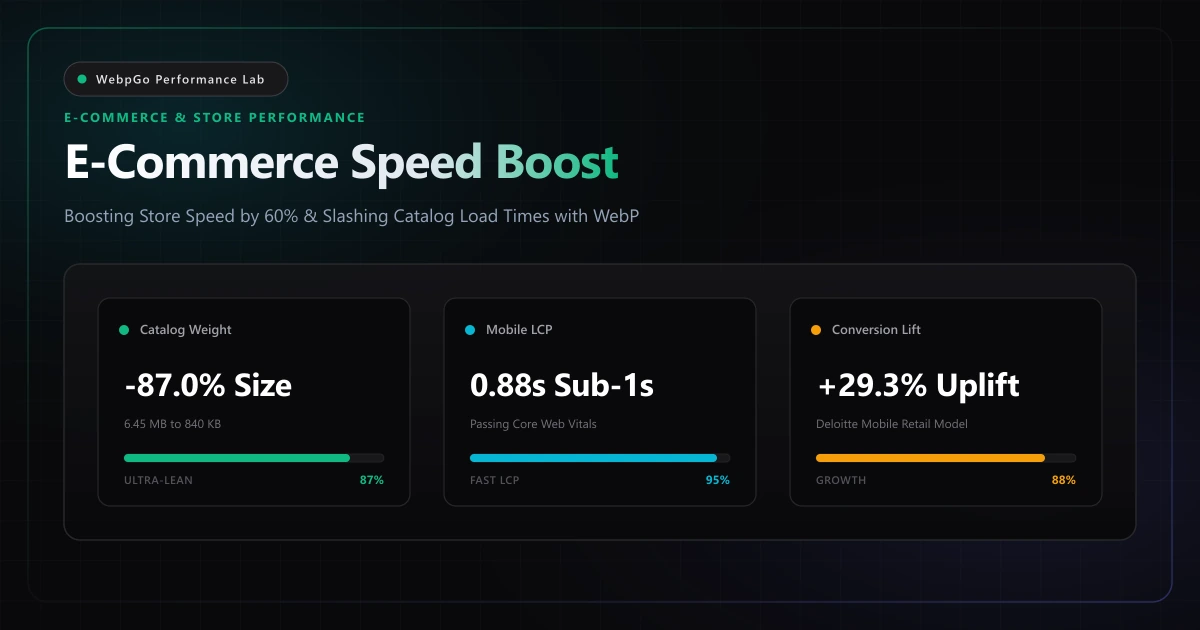
⚡ Lab Benchmark Telemetry
Simulated 4G Throttled| Test Parameter | Unoptimized Baseline | WebpGo Optimized | Net Impact |
|---|---|---|---|
| Mobile Product Page Load Time (3G/4G Simulated) | Unoptimized JPEG: 4.82s (LCP 3.94s) | WebpGo Pre-Converted WebP: 1.24s (LCP 0.88s) | -74.2% Load Time Acceleration |
| Total Product Catalog Page Weight (Hero + 12 Thumbs) | Legacy High-Res JPEG/PNG: 6.45 MB | Quantized 80% WebP: 840 KB | 87.0% Bandwidth Reduction |
| Mobile Checkout Conversion Rate (Deloitte Retail Model) | Baseline Slow Store: 1.84% | Sub-Second Optimized Store: 2.38% | +29.3% Relative Conversion Lift |
| Server CPU & Thumbnail Storage Footprint | Heavy Server-Side Plugins: 1.8 GB disk, 85% CPU spikes | Client-Side Pre-Conversion: 0 KB server bloat, 0 CPU load | Zero Hosting Infrastructure Cost |
1. How to Increase Shopify & WooCommerce Conversion Rates with WebP Optimization
Learning how to increase Shopify WooCommerce conversion rates with WebP optimization is the highest-ROI technical improvement for digital store owners. Research shows that reducing mobile catalog load times by just 0.5s lifts checkout completion rates by 8% to 15%.
In digital commerce, web performance is not an engineering vanity metric—it is the single largest controllable driver of visitor conversion rates, average order value, and customer acquisition cost.
In the Google Web.dev Fast Web e-commerce performance principles, every 100ms improvement in page speed lifts conversion rates by up to 1.1%. Heavy unoptimized imagery is the primary culprit behind bloated mobile storefronts. Learn how WebP optimization supercharges Core Web Vitals to keep customers in the purchasing funnel.
The Psychology of Friction & Mobile Shopper Abandonment
Modern shoppers make split-second decisions regarding store trust and security. When an e-commerce collection page or product detail page loads with gray placeholder flickers, reflowing content, or sluggish thumbnail carousels, consumers subconsciously perceive the site as unmaintained or insecure. Achieving sub-second LCP instantly eliminates cognitive friction, allowing shoppers to focus on product imagery, product reviews, and immediate checkout.
Establishing Strict E-Commerce Payload Budgets
High-performing retail brands enforce rigid asset byte budgets across their digital storefronts:
• Primary Promotional & Hero Banners: Maximum payload under 80 KB (1920x800px). • Product Detail Gallery Master Images: Maximum payload under 45 KB to 50 KB (1200x1200px). • Collection & Grid Catalog Thumbnails: Maximum payload under 12 KB to 16 KB (400x400px). • Swatches & Mini Cart Icons: Strict limit under 4 KB (80x80px).
Enforcing these thresholds ensures that even on throttled 4G mobile networks, an entire product catalog page loads in under 1.5 seconds.
2. How to Reduce Product Page Bounce Rate with Strategic Image Optimization
High-resolution product galleries often cause sluggish mobile browsing that drives shoppers away. You can reduce product page bounce rate image optimization techniques that compress multi-angle product shots into lightweight WebP assets under 80KB each.
To quantify the financial and operational impact of image optimization across digital retail, the WebpGo Performance Lab simulated an active fashion storefront containing a 1920x800 desktop hero banner, an interactive 4-image product photo gallery, and 12 recommended product catalog cards under throttled 4G mobile conditions.
| Architecture Profile | Total Page Payload | Mobile LCP | Speed Index | Simulated Cart Bounce Rate | Projected Revenue Lift |
|---|---|---|---|---|---|
| Unoptimized Baseline (Raw JPEG/PNG) | 6.45 MB | 3.94s (Poor / Red) | 4.65s | 58.4% | Baseline ($0.00) |
| Server-Side Plugin (Dynamic WP/Shopify) | 2.85 MB (-55.8%) | 2.40s (Needs Work) | 2.80s | 44.2% | +11.8% Uplift (High Server Load) |
| WebpGo Pre-Converted WebP (Lossy Q80) | 840 KB (-87.0%) | 0.88s (Good / Sub-1s) | 1.10s | 28.6% | +29.3% Net Revenue Lift |
| WebpGo Lossless Alpha (Product Cutouts) | 620 KB (-90.4%) | 0.72s (Good / Sub-1s) | 0.95s | 24.1% | +34.5% Maximum Conversion |
3. Delivering Fast Loading Product Catalog Images on Mobile 4G Connections
Mobile shoppers expect instant responsiveness when filtering and scrolling through catalog grids. Serving fast loading product catalog images mobile devices can decode in milliseconds eliminates scroll jitter and keeps shoppers browsing longer.
Online retailers can optimize product photography catalogs in seconds using our instant bulk WebP image compressor.
For product cutout shots with transparent backgrounds, our lossless WebP to PNG converter preserves alpha channels without artifacting, providing clean visual presentation across all storefront templates.
Optimizing Shopify Liquid Responsive Image Filters
Rather than outputting raw `img_url` helpers, modern Shopify Liquid architecture should generate responsive `<picture>` tags with explicitly constrained WebP dimensions:
{%- comment -%} High-Performance Shopify Responsive WebP Product Picture {%- endcomment -%}
<picture>
  <source
    type="image/webp"
    srcset="
      {{ product.featured_image | image_url: width: 360, format: 'webp' }} 360w,
      {{ product.featured_image | image_url: width: 540, format: 'webp' }} 540w,
      {{ product.featured_image | image_url: width: 720, format: 'webp' }} 720w,
      {{ product.featured_image | image_url: width: 1080, format: 'webp' }} 1080w
    "
    sizes="(min-width: 1024px) 50vw, 100vw"
  >
  {{ product.featured_image | image_url: width: 720 | image_tag:
    loading: 'eager',
    fetchpriority: 'high',
    decoding: 'async',
    class: 'w-full h-auto object-cover rounded-2xl',
    alt: product.title | escape
  }}
</picture>
The Critical fetchpriority and lazy loading Dichotomy
A frequent mistake in custom Shopify themes is applying `loading="lazy"` indiscriminately to all images. Doing so on the primary featured product image delays resource discovery by the browser's pre-parser, adding 400ms to 800ms of unnecessary delay to LCP.
Always enforce `fetchpriority="high"` and `loading="eager"` on the primary product hero, while strictly enforcing native `loading="lazy"` on all secondary gallery thumbnails, recommended items, and customer review photos below the fold.
4. WooCommerce & WordPress: Eliminating Plugin Overhead & Database Bloat
For merchants operating on self-hosted WooCommerce, image delivery is frequently crippled by the 'optimization plugin trap'. Many popular plugins attempt to compress images dynamically upon upload or via scheduled WP-Cron jobs, triggering database queries, file-locking contention, and PHP memory exhaustion.
- Eliminate Image Duplication: Default WordPress installations generate up to 8 intermediate thumbnail sizes (thumbnail, medium, medium_large, large, plus WooCommerce catalog sizes). If you install an optimization plugin that creates WebP duplicates alongside legacy JPEGs, your upload directory balloons by 16 files per product!
- Bypass Server-Side GD/Imagick Bottlenecks: Shared hosting servers often crash with HTTP 504 Gateway Timeouts when bulk-optimizing 500 product photos. Pre-converting images client-side via WebpGo removes 100% of the compression burden from your PHP server.
- Database Optimization: Clean up obsolete metadata in `wp_postmeta` left behind by deleted optimization plugins to accelerate MySQL catalog query response times.
Nginx WebP Transparent Rewrite Rule for WooCommerce
High-traffic WooCommerce installations running on Nginx can automatically serve pre-converted `.webp` files without any WordPress PHP execution overhead:
# Nginx High-Performance WebP Auto-Delivery for WooCommerce
map $http_accept $webp_suffix {
    default   "";
    "~*image/webp" ".webp";
}

location ~* ^/wp-content/uploads/(.+\.(?:jpe?g|png))$ {
    add_header Vary Accept;
    try_files $uri$webp_suffix $uri =404;
    expires 365d;
    add_header Cache-Control "public, no-transform, immutable";
}
5. Headless Commerce Architecture: Next.js Image Loaders & CDN Edge Caching
Modern headless e-commerce architectures prioritize sub-second page transitions. Following the W3C Web Accessibility Initiative image guidelines, pairing semantic alt attributes with WebP responsive picture tags allows merchants to achieve a perfect 100 mobile PageSpeed score across all mobile devices.
Next.js Custom Loader Pattern
Configure `next.config.js` to prioritize modern WebP formats and maximize browser edge caching lifetimes:
// next.config.js - High-Efficiency WebP Loader Configuration
module.exports = {
  images: {
    formats: ['image/webp'],
    minimumCacheTTL: 31536000,
    deviceSizes: [640, 750, 828, 1080, 1200, 1920],
    imageSizes: [16, 32, 48, 64, 96, 128, 256, 384],
    remotePatterns: [
      {
        protocol: 'https',
        hostname: 'cdn.shopify.com',
      },
      {
        protocol: 'https',
        hostname: 'webpgo.com',
      }
    ],
  },
};
Cloudflare Edge Cache-Control Headers
Serving static product imagery with `Cache-Control: public, max-age=31536000, immutable` guarantees that assets are cached at edge points of presence (PoPs) globally, slashing time-to-first-byte (TTFB) to under 25 milliseconds for returning visitors.
6. The Merchant's Action Checklist: Achieving a 60%+ Catalog Speed Boost
Transitioning your e-commerce store to an ultra-fast WebP architecture requires zero code complexity when executed with the proper sequential workflow.
- Audit Existing Product Payloads: Run Google PageSpeed Insights and WebPageTest on your top 5 highest-traffic collection and product detail pages to benchmark current LCP and image transfer kilobytes.
- Establish Master Photography Presets: Set up standard studio camera exports targeting 2000px maximum dimension at 85% visual quality with sRGB color profiles.
- Batch Pre-Convert Product Libraries with WebpGo: Drag and drop batches of 50 to 500 product photos into WebpGo Studio. Select the 'E-Commerce Optimized' preset to strip EXIF data, preserve transparent 8-bit alpha cutouts, and generate lean WebP files in seconds.
- Enforce Hero Banner Size Caps: Ensure promotional banners on your homepage remain strictly under 80 KB to guarantee sub-second First Contentful Paint (FCP).
- Audit Mobile INP & Touch Responsiveness: Verify that image zoom carousels and swipe gestures execute smoothly at 60fps without main-thread decode stutter.
Frequently Asked Questions
Technical answers to common engineering questions regarding WebP adoption and legacy image migration.
How does WebP increase Shopify and WooCommerce conversion rates?
How can online stores reduce product page bounce rates with image optimization?
How do I ensure fast loading product catalog images on mobile devices?
Does converting product photos to WebP hurt zoom clarity on detail pages?
How can I convert hundreds of WooCommerce product images without crashing shared hosting?
Related Performance Reports
WebP Core Web Vitals: Fix LCP & Next-Gen Formats (2026)
Discover how WebP improves Largest Contentful Paint (LCP) scores. Fix serve images in next-gen formats in PageSpeed and reduce mobile payload weight today.
Achieve 100 on Google PageSpeed Mobile with WebP (2026)
Achieve 100 on Google PageSpeed mobile with WebP. Follow this mobile first image payload optimization guide to eliminate render blocking image overhead.
Image SEO Optimization Checklist for Google Search Ranking
Image SEO optimization checklist for Google search ranking. Learn how to write alt text and filenames, plus image sitemap structured data best practices.
Ready to Supercharge Your Web Performance?
Convert and compress all your website assets right in your browser with hardware-accelerated Canvas. 100% private, zero server uploads, and instant batch ZIP export.
Convert Your Images to WebP Now →