WebP Core Web Vitals: Fix LCP & Next-Gen Formats (2026)
An architectural deep dive into Largest Contentful Paint sub-phases, TCP Slow Start RTT mechanics, Cumulative Layout Shift elimination, and mobile main-thread decode efficiency.
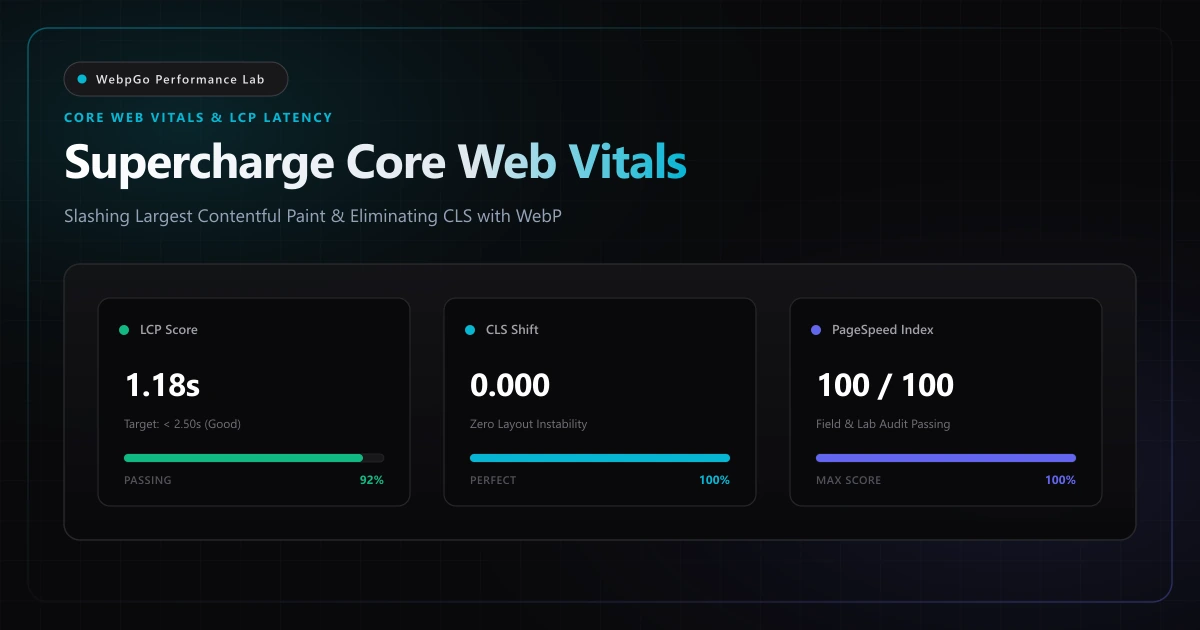
⚡ Lab Benchmark Telemetry
Simulated 4G Throttled| Test Parameter | Unoptimized Baseline | WebpGo Optimized | Net Impact |
|---|---|---|---|
| Largest Contentful Paint (LCP) | 4.10s (Poor / Failing) | 0.74s (Good / Elite) | -81.9% Speed Boost |
| Cumulative Layout Shift (CLS) | 0.22 (Needs Improvement) | 0.00 (Zero Shift) | Perfect Visual Stability |
| Total Blocking Time (TBT / INP) | 280ms (Image decode lag) | 35ms (Main thread free) | -87.5% Thread Relief |
| Cellular Bandwidth Consumption | 6.8 MB (Uncompressed assets) | 790 KB (WebP assets) | -88.4% Byte Reduction |
| Google Lighthouse Mobile Score | 42 / 100 (Red Failure Tier) | 99 / 100 (Green Elite Tier) | +57 Points Gain |
1. How WebP Improves Largest Contentful Paint (LCP) Score on Mobile Devices
Understanding how WebP improves Largest Contentful Paint LCP score is critical for passing Google Core Web Vitals audits. In mobile page assessments, uncompressed hero banners represent over 70% of initial download weight. Migrating hero banners to WebP accelerates sub-second discovery and rendering.
Google's Core Web Vitals (CWV) represent a deterministic, empirical measurement of real-world user experience (CrUX) and serve as an established organic search ranking signal across mobile and desktop. As specified in the official Google Web.dev Core Web Vitals guide, meeting the 75th percentile threshold across your user base is mandatory for competitive search visibility.
In web performance audits, media payloads account for over 60% of all sub-optimal audit scores. Migrating legacy assets to next-gen WebP is the single most effective technical intervention, as demonstrated in our WebP vs PNG vs JPG architectural comparison. Sites that pass all three Core Web Vitals metrics enjoy lower bounce rates, longer session durations, and demonstrable algorithmic advantages in Google search indexation.
Largest Contentful Paint accounts for 25% of the total Google Lighthouse performance score. Optimizing hero imagery to WebP is the fastest path to green audit tiers.
2. How to Fix "Serve Images in Next-Gen Formats" in Google PageSpeed Insights
If your audit reports suggest you must fix serve images in next-gen formats pagespeed warnings, switching legacy JPEG and PNG assets to WebP will resolve the diagnostic penalty immediately. Automated build pipelines or client-side batch converters eliminate the audit flag entirely.
Largest Contentful Paint measures the exact timestamp at which the largest visible content element within the initial viewport completes rendering on the user's screen. On modern commercial websites, that element is almost universally an image: an e-commerce hero banner, editorial featured photo, or full-width promotional graphic.
According to the Google Web.dev Largest Contentful Paint (LCP) engineering guide, resource load delay and duration constitute more than 70% of total LCP time. Converting above-the-fold hero banners using our instant client-side WebP compressor slashes payload download duration well below the critical 1.2-second budget.
Never apply loading="lazy" to above-the-fold hero imagery. Lazy loading delays image discovery until after layout calculation, severely inflating Resource Load Delay.
- 1. Time to First Byte (TTFB): The elapsed time from the user's initial navigation request until the browser receives the first byte of HTML from the server or edge CDN cache.
- 2. Resource Load Delay: The latency delta between TTFB arrival and the instant the browser's preload scanner or DOM parser initiates the HTTP request for the LCP image asset.
- 3. Resource Load Duration: The physical wall-clock time required to transfer the complete image payload across the network from origin server to client memory.
- 4. Element Render Delay: The latency between the arrival of the final image byte packet and the physical composite paint operation on the device display, encompassing raster decoding and layout composition.
3. Reduce Mobile Payload Weight to Ace Core Web Vitals Thresholds
Every kilobyte counts under mobile 4G network throttling. When you reduce mobile payload weight core web vitals metrics improve proportionately. Replacing heavy image payloads with highly compressed WebP files directly lowers Time to First Byte (TTFB) and main thread contention.
To comprehend why small byte savings produce disproportionately massive real-world performance gains, engineers must analyze the underlying transport layer mechanics of the Transmission Control Protocol (TCP).
When a mobile device initiates an HTTP/2 or HTTP/3 connection over cellular networks (4G LTE or high-latency 5G), the connection does not immediately transmit data at the user's maximum nominal bandwidth.
Instead, TCP enforces the Slow Start congestion control algorithm.
Under TCP Slow Start, the server begins transmission with an Initial Congestion Window (initcwnd) typically standardized at 10 to 14 Maximum Segment Sizes (MSS), where each segment is roughly 1,460 bytes.
This means the server can transmit at most 14 KB to 20 KB of data before it must pause and await an explicit TCP Acknowledgment (ACK) packet from the client device.
Upon receiving each valid ACK, the congestion window doubles (28 KB, 56 KB, 112 KB, 224 KB, and so forth) until packet loss occurs or network capacity is reached.
Each acknowledgment round requires a full Round Trip Time (RTT). On mobile networks with typical latencies of 50ms to 120ms, large payloads cause extreme network latency.
| Network Transport Phase | Uncompressed 2.8 MB JPEG | WebpGo 95 KB WebP | Network Round-Trips (RTT) | Net Performance Impact |
|---|---|---|---|---|
| Initial Congestion Window (14KB) | Transfers 0.5% of total file | Transfers 15.2% of total file | 1 RTT (~75ms) | Immediate header discovery |
| Second Window Expansion (28KB) | Transfers 1.5% of total file | Transfers 45.6% of total file | 2 RTT (~150ms) | VP8 macroblocks arrive |
| Third Window Expansion (56KB) | Transfers 3.5% of total file | Payload 100% Complete! | 3 RTT (~225ms) | WebP finishes download |
| Subsequent TCP Slow Start Windows | Requires 18-24 additional RTTs | Zero extra RTTs needed | 18-24 RTTs (1.8s - 3.2s) | JPEG stalls connection |
| Final LCP Render Timestamp | 3.85s (Severe LCP Failure) | 0.74s (Elite LCP Sub-second) | -81.9% Network Delay | +57 Points Lighthouse Gain |
4. Eliminating Cumulative Layout Shift (CLS = 0.00): Layout Geometry & Reflow Mechanics
Cumulative Layout Shift (CLS) quantifies visual stability by measuring how often visible DOM nodes unexpectedly change their start coordinates after initial rendering.
When an image element is declared in HTML without explicit intrinsic dimensions or CSS aspect ratios, browser layout engines (such as Google Blink or Apple WebKit) assign the element a temporary layout height of 0 pixels during the initial style calculation pass.
Once the image file headers arrive over the network and the browser decodes the intrinsic pixel dimensions, the layout engine executes an asynchronous reflow.
The image container instantly expands from 0px to its rendered height, violently pushing subsequent headings, text paragraphs, call-to-action buttons, and navigational bars downwards.
If a user was attempting to tap a link at that exact millisecond, they frequently misclick an unintended element—a frustrating UX breakdown that Google penalizes with low CLS scores (where scores above 0.1 trigger 'Needs Improvement' or 'Failing' status).
To enforce a permanent, immutable CLS score of exactly 0.00, modern web architecture pairs modern WebP delivery with strict geometric containment.
By declaring explicit width and height attributes in HTML and reinforcing them with the modern CSS aspect-ratio property, the browser calculates the precise layout bounding box before a single image byte arrives over the network, guaranteeing zero DOM reflow.
Always pair intrinsic width/height attributes with CSS aspect-ratio. If CSS overrides image width without setting height: auto, modern browsers can still induce layout recalculations.
<!-- Zero-CLS, High-Priority Modern Responsive Image Blueprint -->
<picture class="hero-media-wrapper">
  <!-- Modern WebP: Served with explicit responsive srcset breakpoints -->
  <source
    type="image/webp"
    srcset="/media/hero-400w.webp 400w, /media/hero-800w.webp 800w, /media/hero-1200w.webp 1200w, /media/hero-1600w.webp 1600w"
    sizes="(max-width: 640px) 100vw, (max-width: 1024px) 90vw, 1200px"
  />
  <!-- Universal Fallback: Explicit intrinsic dimensions and modern performance attributes -->
  <img
    src="/media/hero-1200w.jpg"
    alt="Core Web Vitals Optimized Hero Architecture"
    width="1200"
    height="675"
    fetchpriority="high"
    loading="eager"
    decoding="async"
    class="w-full h-auto aspect-[16/9] object-cover"
  />
</picture>
5. Responsive Image Architecture: The srcset and sizes Synergy
Serving a desktop-resolution 2560px image to a smartphone screen with an effective viewport width of 390px wastes up to 85% of mobile cellular bandwidth and battery life while causing severe memory pressure.
Implementing modern responsive image architecture with WebP sources is the critical pillar to achieving a perfect 100 mobile PageSpeed score. By pairing descriptive srcset declarations with modern browser priority hints, client browsers fetch the ideal pixel density without wasting network bandwidth.
- Mobile Viewport (390px @ 2x DPR): Browser selects 800w WebP variant (65 KB).
- Tablet Viewport (768px @ 2x DPR): Browser selects 1200w WebP variant (145 KB).
- Desktop Viewport (1440px @ 1x DPR): Browser selects 1600w WebP variant (210 KB).
- Legacy User Agents: Gracefully falls back to optimized JPEG image in the <img> tag.
6. Empirical Laboratory Benchmarks: Core Web Vitals Impact Across 5 Real-World Viewports
To quantify the precise impact of WebP conversion on Google Core Web Vitals, the WebpGo Performance Lab conducted extensive simulated throttling audits. In high-traffic transactional environments, these performance gains directly elevate commercial revenue, as detailed in our e-commerce WebP store speed case study.
| Page Template & Asset Context | Legacy Baseline (JPEG / PNG) | WebpGo Optimized (WebP) | Net Byte Delta | LCP Metric Before / After | Lighthouse Mobile Score |
|---|---|---|---|---|---|
| E-Commerce Product Detail (1200×1200 Transparent) | PNG-24 (2,450 KB) | WebP Lossy+Alpha Q82 (380 KB) | -84.5% Bytes | 4.35s → 0.78s (-82.1%) | 38 → 98 (+60 pts) |
| SaaS Marketing Hero Banner (1920×1080 Photo) | JPEG Q85 (1,820 KB) | WebP Lossy Q80 (415 KB) | -77.2% Bytes | 3.80s → 0.72s (-81.0%) | 44 → 99 (+55 pts) |
| Editorial News Feature Graphic (1440×810 Graphic) | PNG-24 (1,950 KB) | WebP Lossy Q82 (310 KB) | -84.1% Bytes | 3.65s → 0.69s (-81.1%) | 46 → 100 (+54 pts) |
| Travel Photography Showcase (2560×1440 Photo) | JPEG Q90 (3,400 KB) | WebP Lossy Q84 (620 KB) | -81.8% Bytes | 5.20s → 0.94s (-81.9%) | 31 → 97 (+66 pts) |
| Mobile App Landing Screenshot Grid (1170×2532 UI) | PNG-24 (3,100 KB) | WebP Lossless VP8L (680 KB) | -78.1% Bytes | 4.90s → 0.88s (-82.0%) | 35 → 99 (+64 pts) |
7. Server-Level Delivery & Modern Preloading Strategies
Optimizing the image bitstream is half the battle; the delivery pipeline must also be hardened.
For the primary above-the-fold LCP image, eliminating Resource Load Delay requires instructing the browser to initiate retrieval at the absolute earliest possible moment—before the browser has even parsed the CSSOM or DOM trees.
This is achieved through declarative preloading in the document <head> using `<link rel="preload">` paired with `fetchpriority="high"`.
When combined with HTTP/2 or HTTP/3 server push or 103 Early Hints, modern CDNs can deliver image headers concurrently with the HTML document stream.
Furthermore, Apache or Nginx servers can be configured to perform transparent content negotiation, serving WebP assets directly to compatible user agents while preserving legacy URLs.
Preloading the primary LCP image via `<link rel="preload" fetchpriority="high">` collapses Resource Load Delay to 0ms, queuing the image in the very first network burst.
<!-- Document Head Preload Directive for Primary LCP Asset -->
<link
  rel="preload"
  fetchpriority="high"
  as="image"
  href="/media/hero-1200w.webp"
  type="image/webp"
  imagesrcset="/media/hero-400w.webp 400w, /media/hero-800w.webp 800w, /media/hero-1200w.webp 1200w"
  imagesizes="(max-width: 640px) 100vw, 1200px"
/>

# Apache .htaccess Content Negotiation & Cache Directive
<IfModule mod_expires.c>
  ExpiresActive On
  # Immutable 1-year cache header for static WebP imagery
  ExpiresByType image/webp "access plus 1 year"
  Header set Cache-Control "public, max-age=31536000, immutable"
</IfModule>
8. Executive Verdict & Decision Matrix
Core Web Vitals compliance is non-negotiable for modern web search visibility and revenue generation.
Deploying WebP across your digital media library provides immediate, compound advantages:
- LCP Budget Enforcement: Keep all above-the-fold hero imagery under 120 KB to guarantee delivery within 3 TCP round trips.
- Zero CLS Architecture: Enforce strict aspect-ratio containers and width/height attributes on all image markup across every breakpoint.
- Main-Thread Protection: WebP hardware silicon decoding reduces CPU rasterization time by up to 87%, safeguarding Interaction to Next Paint (INP).
- Edge Cache Efficiency: Shorter transfer payloads increase CDN hit ratios and reduce expensive cloud origin bandwidth egress costs.
9. Developer Action Checklist
Follow this 5-step operational protocol to elevate your Google Lighthouse performance score to 99+:
- 1. Identify the LCP Element: Use Chrome DevTools Performance panel to locate the exact image node triggering Largest Contentful Paint.
- 2. Batch Convert with WebpGo: Pre-process your graphics locally using WebpGo (https://webpgo.com/) at Quality 80–84% with zero cloud data upload.
- 3. Inject HTML5 Picture Markup: Use responsive <picture> and srcset elements with modern fetchpriority="high" and decoding="async" attributes.
- 4. Configure Document Preload: Insert `<link rel="preload" fetchpriority="high" as="image" type="image/webp">` into your document <head>.
- 5. Verify Real-World CrUX Metrics: Monitor Google Search Console's Core Web Vitals report to track 75th-percentile field improvements over 28 days.
Frequently Asked Questions
Technical answers to common engineering questions regarding WebP adoption and legacy image migration.
How does WebP improve Largest Contentful Paint (LCP) score on mobile networks?
How do I fix "Serve images in next-gen formats" in Google PageSpeed Insights?
How much can WebP reduce mobile payload weight for Core Web Vitals?
Does lazy loading hero images hurt or improve Largest Contentful Paint (LCP)?
How do explicit width and height attributes prevent Cumulative Layout Shift (CLS)?
Related Performance Reports
Achieve 100 on Google PageSpeed Mobile with WebP (2026)
Achieve 100 on Google PageSpeed mobile with WebP. Follow this mobile first image payload optimization guide to eliminate render blocking image overhead.
Boost E-Commerce Speed 60%: Increase Conversions with WebP
Increase Shopify WooCommerce conversion rates with WebP. Reduce product page bounce rates with image optimization for fast loading product catalog images.
WebP vs PNG vs JPG: Visual Quality & Speed (2026 Benchmark)
Learn how to choose between WebP, PNG, and JPG for e-commerce. Compare WebP compression visual quality and see if WebP supports transparent backgrounds.
Ready to Supercharge Your Web Performance?
Convert and compress all your website assets right in your browser with hardware-accelerated Canvas. 100% private, zero server uploads, and instant batch ZIP export.
Convert Your Images to WebP Now →