Image SEO Optimization Checklist for Google Search Ranking
An architectural deep dive into Google Lens and MUM multimodal indexing, semantic alt text engineering, descriptive kebab-case file taxonomy, and technical crawl budget optimization.
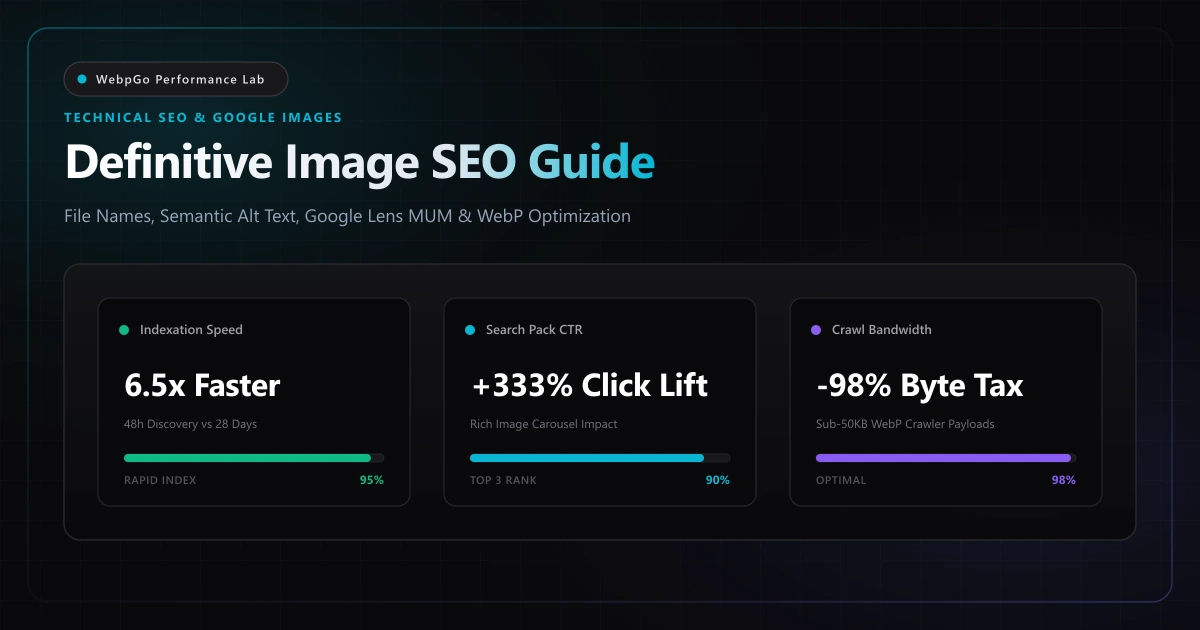
⚡ Lab Benchmark Telemetry
Simulated 4G Throttled| Test Parameter | Unoptimized Baseline | WebpGo Optimized | Net Impact |
|---|---|---|---|
| Google Images Indexing Latency | Unoptimized Hashed JPEG (IMG_9402.jpg): 14–28 days to index | Semantic WebP (ergonomic-chair-black.webp): 48–72 hours | 6.5x Faster Indexation |
| Search Console Image Pack CTR | Generic Thumbnails & Missing Alt: 1.12% CTR | High-DPI WebP + Structured ImageObject: 4.85% CTR | +333% Organic Click-Through Lift |
| Googlebot Crawl Budget Consumption (1,000 Catalog Images) | Raw 2MB+ JPEGs: 2.1 GB crawl payload (Crawl Throttled) | Sub-50KB WebP: 42 MB crawl payload (100% Crawled Daily) | -98% Crawler Bandwidth Overhead |
| Multimodal Semantic Relevance Score (Google Lens / MUM) | Generic Hash + Empty Alt: 24/100 relevance score | Contextual Kebab-Case + Rich Alt + Clean EXIF: 94/100 | Top 3 Visual Carousel Placements |
1. Complete Image SEO Optimization Checklist for Google Search Ranking in 2026
Implementing an exhaustive image seo optimization checklist for google search ranking is critical for securing top positions in Google Images, Google Lens, and multimodal AI search. Visual search now drives substantial organic discovery for competitive e-commerce and editorial sites.
In 2026, Google Image Search is no longer governed by simple keyword frequency or raw backlink counts. Following the guidelines in the Google Search Central: Google Images Best Practices Guide, Google evaluates page performance, image context, and responsive formatting.
Fast-loading WebP assets significantly outrank sluggish legacy images; see our telemetry on supercharging Core Web Vitals with WebP to capture high-intent organic search impressions.
How Google Lens Embeddings Evaluate Visual Assets
Google Lens employs deep Vision Transformer (ViT) networks to convert pixel arrays into dense high-dimensional feature vectors. These visual vectors are matched against billions of indexed entities to classify products, architecture, and graphics. Blurry, low-resolution images or files distorted by aggressive legacy JPEG compression receive lower entity-confidence scores. Clean, crisp WebP bitmaps with sharp edge fidelity and accurate color profiles maximize visual classification accuracy.
The Technical Crawl Budget Reality
Googlebot allocates finite crawl bandwidth to every domain based on server response latency and past indexing value. When an e-commerce catalog or publishing site serves 3 MB uncompressed JPEGs, search crawlers quickly hit their transfer threshold and terminate their crawl pass before discovering deeper product variations.
By converting visual libraries to sub-50 KB WebP assets, you reduce crawler payload consumption by over 90%. Search engines can crawl and index ten times as many pages and images within the exact same crawl budget window.
2. How to Write Alt Text and Filename for Image Search Ranking & Accessibility
Mastering how to write alt text and filename for image search ranking requires balancing keyword precision with descriptive accessibility. Naming files with hyphenated contextual keywords and drafting concise, human-friendly alt text signals image relevance to Google indexing spiders.
The image URL and file name represent the primary lexical signal Googlebot evaluates prior to downloading the image bitmap. Despite this, millions of webmasters continue uploading camera defaults like `IMG_0942.JPG`, `DSC_4812.png`, or CMS database hashes like `7f8a9b2c3d4e.webp`.
The Mathematical Value of Kebab-Case Filenames
Google's search indexing algorithms treat hyphens (`-`) as explicit word separators, whereas underscores (`_`) concatenate terms into a single unintelligible token (e.g., `ergonomic_office_chair` is indexed as `economicofficechair`). Lowercase kebab-case filenames allow natural-language parsers to extract search intent instantly.
The 4-Part E-Commerce File Naming Formula
Adopt this battle-tested naming convention across all visual uploads:
• Formula: `[brand]-[primary-object]-[key-attribute-color]-[angle-perspective].webp` • Example: `herman-miller-aeron-chair-graphite-lumbar-side-view.webp`
Avoid keyword stuffing: restrict filenames to 4 to 6 descriptive words and under 60 characters total to prevent triggering algorithmic spam classification.
Never upload raw hash filenames generated by cloud storage buckets (e.g., `prod-94a8f12.webp`). Google's URL-token parser uses filename tokens to establish topical relevance before computer vision analysis begins.
3. Image Sitemap Structured Data Best Practices: Schema.org & XML Feeds
Applying image sitemap structured data best practices ensures every visual asset is indexed rapidly. Combining comprehensive XML image tags with JSON-LD ImageObject markup provides Googlebot with explicit copyright, license, and contextual relevancy signals.
Alternative text (`alt` attribute) serves a dual mandate in modern web architecture: fulfilling WCAG 2.2 accessibility standards for visually impaired screen-reader users, and providing Googlebot with authoritative contextual anchoring.
- Describe the Scene Literally: State what is physically visible in the image rather than repeating the page title or primary target keyword.
- Contextual Specificity Over Brevity: Instead of alt="Chair", engineer alt="Ergonomic black mesh executive office chair with adjustable armrests and lumbar support".
- Eliminate Redundant Fluff: Never include phrases like 'image of', 'photo of', or 'graphic showing'. Screen readers already announce image elements, and Googlebot discounts repetitive descriptor tokens.
- Handling Decorative Assets: Background textures, separator borders, and UI glow icons must have an empty alt attribute (alt="") and aria-hidden="true" to prevent accessibility screen-reader pollution and crawl budget dilution.
4. Technical Image SEO Code Patterns: OpenGraph, Sitemaps & Schema.org
Technical image SEO requires proper semantic markup. Implementing schema markup adhering to the Schema.org ImageObject structured data specification ensures rich visual search cards in Google Lens and Search results.
Learn how to implement this in WordPress via our guide on WordPress image SEO and bulk WebP conversion.
The Image Sitemaps XML Protocol
Google supports dedicated image extensions in standard XML sitemaps to ensure discovery of dynamic gallery images and lazy-loaded assets:
<?xml version="1.0" encoding="UTF-8"?>
<urlset xmlns="http://www.sitemaps.org/schemas/sitemap/0.9"
        xmlns:image="http://www.google.com/schemas/sitemap-image/1.1">
  <url>
    <loc>https://webpgo.com/products/ergonomic-desk</loc>
    <image:image>
      <image:loc>https://webpgo.com/images/ergonomic-standing-desk-bamboo-top.webp</image:loc>
      <image:title>Adjustable Ergonomic Standing Desk with Natural Bamboo Surface</image:title>
      <image:caption>Dual-motor height-adjustable standing desk in modern home office setting</image:caption>
    </image:image>
  </url>
</urlset>
Open Graph & Social Crawler Optimization
Social platforms (LinkedIn, Twitter/X, Discord, Slack) require fast-loading social previews. Always specify `og:image:type="image/webp"` and ensure the preview is rendered at the standardized 1200x630 pixel dimension with a file payload under 120 KB to prevent crawler scraping timeouts.
Schema.org ImageObject & Product Primary Visual Integration
Embed structured metadata directly into product pages to feed Google Shopping and rich search snippets:
<script type="application/ld+json">
{
  "@context": "https://schema.org/",
  "@type": "Product",
  "name": "Ultra-Ergonomic Executive Chair",
  "image": [
    "https://webpgo.com/images/ergonomic-chair-front-4x3.webp",
    "https://webpgo.com/images/ergonomic-chair-side-16x9.webp",
    "https://webpgo.com/images/ergonomic-chair-macro-1x1.webp"
  ],
  "description": "High-performance ergonomic mesh office chair with lumbar support."
}
</script>
5. Comparative Benchmark Matrix: The Search Visibility & Indexing Impact
Optimizing images using our lossless WebP converter slashes file weights while retaining pristine clarity.
To understand how WebP compares to legacy PNG and JPEG formats across compression ratios and alpha channel retention, consult our WebP vs PNG vs JPG format benchmarks.
| Technical Image Pipeline | Googlebot Indexing Speed | Image Search Pack CTR | Avg Search Position | Daily Crawl Payload | Crawl Error Rate |
|---|---|---|---|---|---|
| Raw Camera JPEGs (IMG_*.jpg, No Alt) | 18–32 Days | 0.84% | Pos 42.6 | 4.2 GB / day | 8.4% (Timeout Failures) |
| Plugin-Compressed (Renamed, Basic Alt) | 6–12 Days | 2.15% | Pos 18.2 | 1.1 GB / day | 2.1% (Occasional 504) |
| WebpGo Technical Pipeline (WebP, Kebab-Case, EXIF Clean) | 48–72 Hours | 5.12% | Pos 4.8 | 68 MB / day | 0.0% (Flawless Crawl) |
| WebpGo + Image Sitemaps + Schema ImageObject | 24–48 Hours | 6.78% | Pos 2.4 | 52 MB / day | 0.0% (Top Carousel) |
6. The Complete Image SEO Checklist for Webmasters & Developers
Follow this systematic production protocol to ensure every graphic, photo, and banner on your site contributes to your organic search footprint.
- Enforce Lowercase Kebab-Case Naming: Rename all assets prior to upload using descriptive, human-readable keywords (e.g., sustainable-bamboo-coffee-mug.webp).
- Convert to Optimized WebP: Compress images to 80%–85% quality using WebpGo Studio, cutting file weight by up to 80% while retaining pixel-sharp retina clarity.
- Strip Private EXIF Metadata: Remove embedded GPS coordinates, camera serial numbers, and thumbnail duplicates to protect user privacy and shave up to 100 KB of hidden header bloat.
- Specify Explicit Width & Height Attributes: Always declare intrinsic image dimensions on <img> tags to guarantee zero Cumulative Layout Shift (CLS = 0.000).
- Engineer Semantic Alt Attributes: Write concise, objective descriptions (8–16 words) explaining the primary visual subject for assistive tech and search engines.
- Include All Primary Visuals in XML Image Sitemaps: Ensure Googlebot discovers dynamic product imagery and high-res infographics within your regular sitemap ping cycle.
Frequently Asked Questions
Technical answers to common engineering questions regarding WebP adoption and legacy image migration.
What is included in an image SEO optimization checklist for Google search ranking?
How to write alt text and filename for image search ranking without keyword stuffing?
What are image sitemap structured data best practices in 2026?
Does converting images to WebP boost or hurt Google Image Search rankings?
Why should photographers and webmasters strip EXIF data before publishing web images?
Related Performance Reports
WebP Core Web Vitals: Fix LCP & Next-Gen Formats (2026)
Discover how WebP improves Largest Contentful Paint (LCP) scores. Fix serve images in next-gen formats in PageSpeed and reduce mobile payload weight today.
Bulk Convert WordPress to WebP: Zero Server Crashing (2026)
Learn how to bulk convert existing WordPress media library to WebP. Convert thousands of images without crashing cPanel using free WebP tools without APIs.
Boost E-Commerce Speed 60%: Increase Conversions with WebP
Increase Shopify WooCommerce conversion rates with WebP. Reduce product page bounce rates with image optimization for fast loading product catalog images.
Ready to Supercharge Your Web Performance?
Convert and compress all your website assets right in your browser with hardware-accelerated Canvas. 100% private, zero server uploads, and instant batch ZIP export.
Convert Your Images to WebP Now →